How to recover your save game from the cloud
A recent Meta Horizon OS update changed how the headset handles local files and cloud synchronization.This has unfortunately caused save data to temporarily disconnect for some users across multiple games.In many cases, your progress is not permanently lost and is still safely stored in Meta's cloud.
Please try the following steps to force the headset to sync and restore your progress:Check your Cloud Backup status on a PC/Phone:Go to oculus.com and log in with your Meta account. LINK Look for our game in the list.
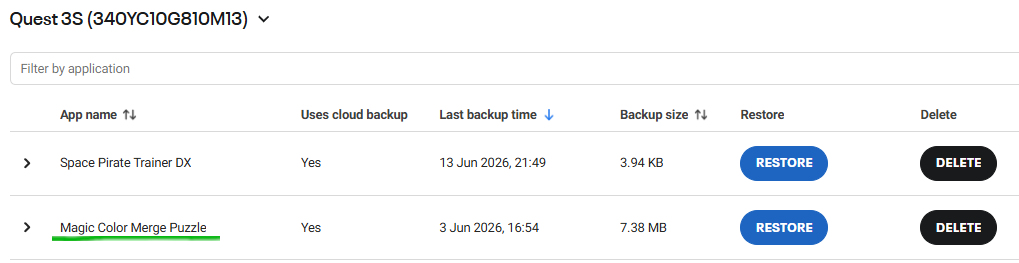
If you see it there with a recent timestamp and file size, your data is safe in the cloud.
Step-by-step instructions on how to recover your save game from the cloud
- Locate the game in your Cloud Backup list.
Find our game on the page and click the > (arrow) icon on the left side next to the app name. This will expand the list of all available cloud saves. - Identify the correct save slot.
Look at the timestamps of the listed saves to find the one from before your progress disappeared.
- Restore the data.
Click the Restore button next to the chosen timestamp.Restart your headset.Once the restore is complete, restart your Quest headset and launch the game. Your progress should now be restored.
If you played the game after noticing the progress loss, the system might have automatically created a new cloud save. The very last save in the list is likely your new, empty progress. Make sure to skip this latest entry and select an older timestamp from when your original progress was still intact.
Alternatives
Force a manual synchronization:
Turn on your Quest headset.
Open the Meta Horizon app on your smartphone and ensure it is actively connected to your headset via Bluetooth.
Keep the phone app open for a minute, then launch the game.
This often forces the headset to re-verify your profile and pull the latest save from the cloud.
Check End-to-End Encryption:If you recently enabled or changed the Cloud Backup End-to-End Encryption PIN on your headset after the OS update, please ensure you entered the correct PIN. If the PIN is incorrect or mismatched, Meta OS will block the game from accessing your old cloud saves.